Lock Part Rotation when Nesting and Mirror/Flip Part
Matt RohrerMay 306 comments
I find the need to be able to lock part rotation when auto nesting.
Use case 1
If you have long narrow parts and the program wants to nest them parallel to the slats then they can tip up and cause issues.
But if you can force the parts to nest across the slats then you can run the nest without worrying about collisions.
Use case 2
Sometimes you need to specify which direction the grain of the metal runs, because the grain direction can make a diference when bending the part, or to make a grained finish on the material run the right way.
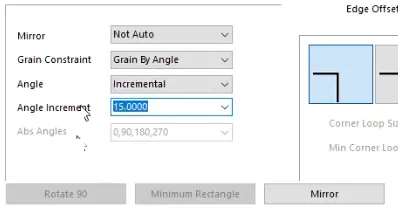
What I'm used to is manually locking the rotation per part rather than trying to get the software to recognise which parts to use it on.
To make it better than in the software I've used , if there was a way to give it a few degrees of freedom rather than locking it totally. Something like +/- 15 Deg?
Screenshot of what I'm used to- I don't have the software in front of me, but I can get a screenshot of the options next week if you wish.
 .
.
Just noticed the mirror option, that flips the part front to back. Handy if your part imports upside down, or your' cutting something like tread plate that you cut with the tread facing down, but your DXF/design is from the tread surface.
6 Comments
showing 6–6 of 6Sure! I attached one here.
Some really nice features. For plasma type machines, we can use "Shuttle Jog" tool that allows jogging through the actual cut program like we're fast forwarding or rewinding a tape. then we can just press the start button where ever we're at in the shuttle jog (even if it's mid segment in a move) and it will automatically touch off the torch and start cutting there. We'll also be able to jump into specific gcode lines or right click on a preview line and jump in that way. There's gonna be a fine-grained jump in (mid move segment) that when the tool is active gives us fine grained points we can choose to start from.
All supported controllers (streaming controllers like GRBL) get Full LinuxCNC NGC support for variables, subroutines, conditional logic, and Tool offsets (including Height H words and Tool XY offsets) in Gcode. LinuxCNC integration and JetFlight pass that functionality to each respectively otherwise GcodePilot handles it which is something out of reach for hobby controllers without a system like this because there are no other senders that provide this functionality. It also gives the ability to map Gcode controlled M66, etc Gcode to other controllers via USB or Network so additional I/O to control complex tool changers and such are now in reach for GRBL, FluidNC, etc.
I'm adding a conditional Hooks engine that works like Plasma's cutting rules. This gives us the ability to set conditions that if met can inject gcode are execute feed holds or programmed stops. That system is important for Crash detection using Ohmic sensing during program runs. For example we could create a hook that feed-holds, turns of the arc, and retracts the torch without disrupting program run. It can Emit a (MSG) comment which fires a dialog with the MSG and waits for a User to press Continue.
For plasma type machines, I'll have advanced feed-hold enabled by default where if you feed hold during a cut it will stop and retract the torch. Pressing start will automatically touch off mid segment and get back into the cut without a pierce delay right where you left off with the option to disable THC for a period of time the expires once the ARC voltage stabilizes.
I'm planning a wide range of pedant support as well.
I'm a few days away from an initial release because I have some testers ready to go. I'll of course continue adding features and polishing as time goes on but the initial release will contain most all of these features. It'll have a subroutine template library that makes initial machine setup pretty straight forward especially for plasma machines. One of my testers runs ohmic with floating head backup so that will be a ready to use template as well as just ohmic and just floating head.
I can talk to Scott at Promach LTD in Corowa Australia because he might be interested in selling you one of his StrikeCommand Boards for your retro-fit. That's a ready to use system that you can wire into your existing machine (assuming it's Step/Dir with Mach3) that gets you integrated AVTHC, Ohmic, Floating Head, Homing, etc. It's a turn key system that GcodePilot supports out of the box. He bought my previous motion control system called Xmotion and re-branded it to StrikeCommand years ago. It uses a custom build of GRBL_Hal that we've added CRC32 over the USB->Serial stream (Critical for Plasma Use due to electrical noise) and the AVTHC support.
Promach is my first OEM partner and his machine will be shipping with JetCad3 as a FlashCut alternative soon. He offers FlashCut and StrikeCommand as his two control options but would like to move away from FlashCut in favor of JetCad3. As it stands, we have more features than FlashCut across the board and especially for routing due to Adaptive toolpaths which they do not have. FlashCut routing is very basic.
I'm also in talks with AvidCNC out of Washington State. They may be interested as an OEM Partner. If you have a close relationship with your machine builder, maybe you could let them know about this https://jetcad.io/oem-partners
Let me know if you have any other questions or if there is any features you'd like to see right away with GcodePilot that I have not thought of yet
GcodePilot - Demo.mp4
Sign in to leave a comment or vote.
Sign In