Post Conversion
Matt RohrerMay 1618 comments
When I go to convert my Sheetcam post I get this error.
Screenshot 2026-05-16 070541.png
18 Comments
showing 11–15 of 18Works fine for one part, but not for multiple, here is a multi part gcode file from Sheetcam.
And
N0090 (Process: Inside Offset, Shape, T1: Mild Steel-1/4-45A-134V-Shielded)
I would delete the Inside Offset,Shape., Inside offset is equivalent to climb cutting and shape is the layer used for the toolpath, neither is needed in my opinion, and default to T1, since you don't use more than 1 tool in plasma.
Also attached is the cut chart from Fastcut CNC with the THC Voltages.
I created a DXF with two parts. I posted toolpaths from SheetCAM with the FastCut post you provided and I posted the same two parts from JetCad3 to compare the difference in Gcode output.
What I see is JetCad3's post is emmiting a (Process: ***) comment per Contour and SheetCAM is posting the process comment per Operation and including the Offset type and layer. The SheetCAM post is just announcing the operation type that's chose on the operation. I also see that I didn't include M62/M63 (DTHC On/Off). I missed that earlier
JetCad's Plasma workspace is not "Operation" based, it's cut chart based so it posts out per part. So I can emit the Process comment per part instead of per contour or I can emmit it once as which would be functionally equivalent to posting all parts in sheetcam as a single operation and let sheetcam do the AABB containment for inside offsets. Many people post large nests in sheetcam this way with a single operation because it's quick and easy...
So I'm really confused by what you mean by works fine for one part, but not for multiple. My understanding from your previous answers is that you look at the comment in the gcode file and set Mach3's DTHC setting from what's written in that comment because only On/Off is command-able via Gcode. What exactly isn't working for multiple parts? I posted several nests out with the flashcut post processor I build and it's always producing good gcode. I passed each through ncviewer.com just to make sure everything is right visually and all is well.
I also cross checked about half a dozen arc voltage settings from the "Fastcut CNC Hypertherm 45XP Cut Chart.txt" against the factory hypertherm chart data that is built into JetCad3 and everything was within a few volts so I don't really know what more you need with that.
"Inside offset is equivalent to climb cutting". That's not true. Winding direction is climb/conventional with Even/Odd parity in contour containment. You can actually post toolpaths from JetCad3 with conventional or climb milling for inside and outside offsets independently. An inside offset is simply a "hole" in simple terms, it's a contour that is fully contained inside another contour.
I'm going to fix my mistake with the DTHC on/off and wait for you to reply with more information as to what's not working for multiple parts. As far as I can tell, you should be able to cut an entire nest of parts right now no problem but you would have to turn your DTHC on manually or run without DTHC.
So I updated the post on my end so the changes will be bundled in future release with working DTHC on/off and I added a header comment that states the selected cut chart item and then after that it spells out in the next comment DTHC: [arc volts]. Correct me if I'm wrong but that's all you need. You just need a to know what consumable needs to be in your torch and what voltage setting to set it too when you go to run a program. It's now just the 4th and 5th line of the posted gcode file, conveniently
I attached it here. I'm open to a hopping on the phone with you sometime this week if this still doesn't get you up and running!
I will test it next week, what happened was if I nested one part everything went fine, but if there was more than on part then mach3 hung after the first part.
Thanks for your work on it.
Oh, interesting. I actually don't think that's related to the Gcode at all. It's functionally equivalent to what SheetCam is posting. You mentioned you where having PC problems with that earlier today so I wonder if something unrelated to the gcode is going on. None the less, lets get this nailed down early this week when it's convenient for you. I don't know what my schedule is for the week yet but I do see some bad weather on the forecast so I should have extra shop time this week during the day. When it's nice, I'm out climbing trees with my Tree Service.
You're welcome! Thanks
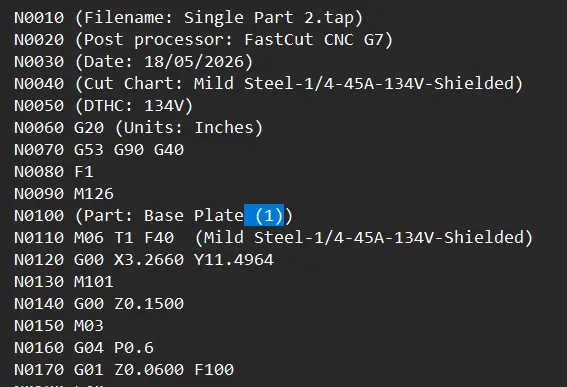
I think I found the issue, the first post is fine, if you add more parts and post again, it adds the (1) and Mach3 can't figure out what to do and stops there.
If I delete the (1) it runs fine or if I manually unlock the previouly locked parts and repost, it will not add the (1).
And sorry, I didn't realize those THC volt values were from Hypertherm, I just figured they were Fastcut CNC specific.
Sign in to leave a comment or vote.
Sign In