Inport from design to drafting. drafting freezes
Accounts Conway WeldingAug 46 comments
When import file from design to drafting drafting freezes. tried condensing file so only importing sections. wanting to turn design into sheet metal component. V2.4.3 have saved out individual layers as dxfs and tried importing seperately
6 Comments
showing 1–5 of 6Alright, interesting. I’ll have time to take a look at this in about 2h.
trim function in design also very laggy
I just wanted to give you an update on this. I've been working on this for 4 hours now. I've been able to reproduce the bug no problem. You stumble across a really good one. No-one else, including me, has hit this yet but it was a major under-sight that touches multiple sub-systems. Most of the work is done right now but I'm out of time for tonight. Once I have this fix fully tested, I'm gonna push a new release (hopefully tomorrow) that will address this bug & your Design workspace trim tool slowness.
On another note, one of my goals with the drafting workspace is to make it as fast as possible on modest hardware. Your design is very vertex dense and even with a lot of compute to work with, the drafting workspaces sketch editor can only be as fast as the hardware will allow when interactions become per segment (line/arc/polyline/etc) vs dealing with individual polygons. The Design workspace is where the dense artistic stuff works and I think your most efficient work flow for doing what you're doing is to design your folded part first essentially the outline and the fold. Then flatten that to a sketch and import it to design and place all your vertex dense artwork on the already flattened pattern to prepare it to cut. So, in the process of thinking about that workflow to suggest to you, I noticed that JC3 does not currently have a convenient "Import from Drafting Sketch" path in the Design workspace, so I'll be adding that into this release I'm preparing for this issue.
One more thing I noticed from seeing your design. See this screenshot
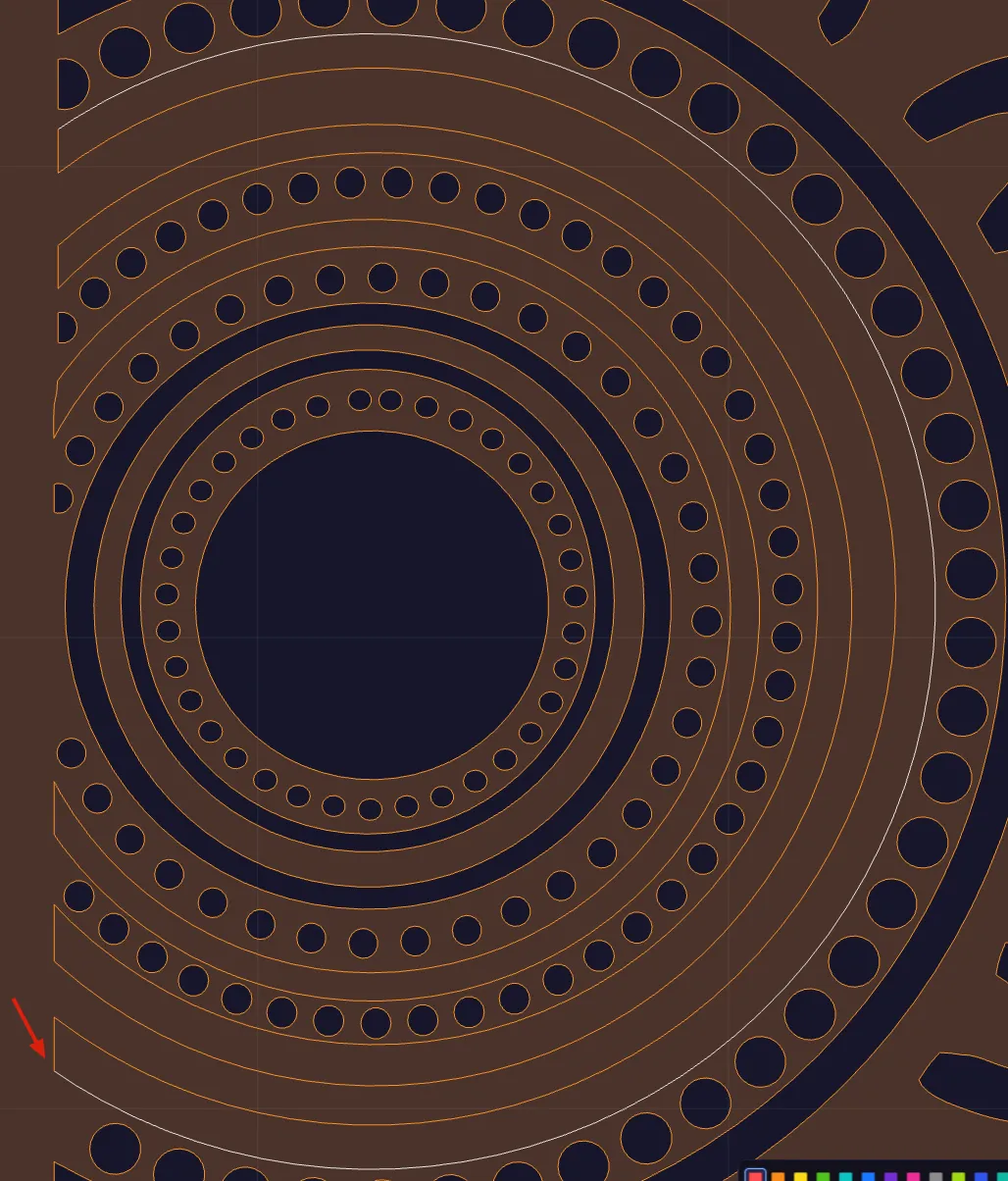
We have several examples like this throughout where we have individual arcs and lines that form a closed shape but they're physically disconnected from each other as individual open paths but they are grouped (which is not geometry joining). Can you tell me how you drew those arcs and lines? The only thing I can think of is you must have hand traced a bitmap on the canvas with the line tool but didn't close them into a shape? I actually had not considered that this was a possibility and didn't think to build a join tool to join those four individual open paths into a single closed path.
This is fixed and going out in v2.4.4 — the release should be available to download in about an hour.
The freeze. Bringing dense artwork into a Drafting sketch runs region detection over every closed contour, and that step was doing far more work than it needed to. It's rebuilt — your sign panel went from hours of apparently-hung app to about a second. Detection also runs in the background now, so even an enormous sketch can't lock up the interface, and the progress indicator tells you the truth while it works. Region boundaries come back identical to the last decimal, so anything you've already modelled re-opens exactly as you saved it.
Trim being laggy in Design. Same file, same cause — the workspace was re-deriving every shape on every mouse move. Trim went from about six seconds per cursor movement to under ten milliseconds, and dragging, hovering and marquee select got the same treatment. It's verified against designs ten times heavier than yours, so there's plenty of headroom.
One you didn't ask for. While I was in your file I found those rings I mentioned are each four separate open pieces — 72 pieces making up 18 rings. If you ever want them as actual closed shapes, Auto-Close couldn't get you there, because it closes a shape against itself, so on one piece of a ring it just slams a chord across it. So there's now a Join (Shift+J, toolbar and right-click): select the lot and all 18 rings come back closed in one press. And right-clicking a piece that touches its neighbours now offers Join & Close, which finds the rest of the ring for you even if you only grabbed one piece.
Also worth a look. Design has a proper Import / Export section now, including Import From Drafting — so you can flatten your folded part first and bring that sketch into Design to lay the artwork on. Print and Send To… are in there too.
Thank you for your reply. I am a novice user with limited to no experience in the drafting/designing of things. only been using the program for about a week or so learning as i go. I have a little experience with sketchup but it is a completely different platform to use so this is all very new to me.
As far as answering you about your screen shot, all I did was copy the full design of rings and moved into position, then offsetted my outer boundry inwards desired amount and then using the trim function deleted out lines i didnt want if that makes sense.
as i said i am a novice learning the program and how to go about drawing things. your feed back has been helpful thank you.
Sign in to leave a comment or vote.
Sign In