File import behavior inconsistencies
Joel SteinerSep 10Edited6 comments
Running latest version.
I enjoy using the "Import and set QTY" button because that pops up a dialog where I can select whether parts are inches or MM. But invariably, this workflow breaks up my drawing into separate parts. Often this is not an issue, but sometimes I need to keep the layout I'm importing.
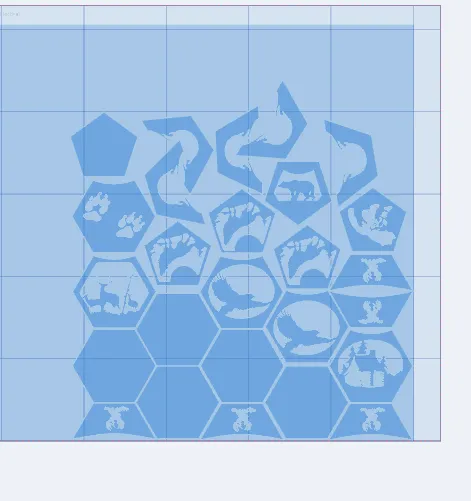
Dragging a file in from a file explorer window pops up "Grid layout" or "keep placement" buttons, so I can keep my nest arrangement. But this offers no inch or mm select option, so some imports need to be scaled after importing. I prefer to keep my software settings in inches, but probably a good half or more of the drawings I import are in mm. Here is an example of a time when I can nest much more efficiently than the auto-nester, and want to keep placement:
- Here's my layout, directly imported from Inkscape:
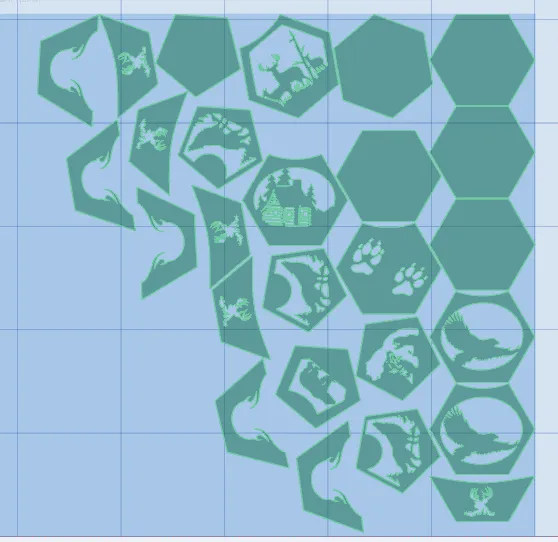
- And here's an auto nest, MAX effort: Much more wasted space.
6 Comments
showing 1–5 of 6My last post was simply a complaint with no suggested resolution. It would be nice, IMO if the "import and set qty" dialog had "grid layout" and "keep placement" options. That would address my workflow issue.
Joel,
Your follow-up clarified the workflow, and I’ve built it that way for the next update:
- Import and Set QTY now includes Grid Layout and Keep Placement.
- The Inch/MM selection remains in that same dialog. For DXFs,
provides the initial suggestion when present; otherwise it defaults to your Preferred Units. You can always override it. - Keep Placement preserves the original arrangement of the first copy of each part while still creating separate CAM parts.
- Additional quantity copies are placed in the loose-parts staging area, and Keep Placement does not automatically run the nester.
- Keep Placement is available for a single imported file. Multi-file imports continue using Grid Layout with independent unit selections.
This is being added consistently across Plasma, Oxyfuel, Laser, and Router.
I’ve also added a Staff Only option for attachments that shouldn’t be public. Files marked Staff Only can only be accessed by JC3 staff.
Could you attach the exact .jc3 project shown in your nesting screenshots and mark it Staff Only? I’d like to use it as a validation case for the next set of nesting heuristics, specifically for octagonal geometry. A few weeks ago I added improved heuristics for square and triangular parts; octagonal parts are the next case that needs attention. Having your exact geometry will let me measure the improvement against the MAX-effort result instead of trying to reconstruct it from screenshots.
Hi Travis, further on this one: It seems when importing more than 1 item, the option to select units for each drawing is not presented. I'm running the latest version -- just upgraded today.
I am getting message "Failed to upload image.png: Upload failed" when I try to paste a picture into the editor here. Similarly, using the file upload box below the editor results in error "Upload failed." But this one shouldn't be hard to repro without a screenshot.
Joel, I found and fixed the website attachment problem. A server restart left the attachment storage unmounted. Uploads and existing attachments are working again, and I’ve added startup safeguards and storage-specific monitoring with email alerts to prevent a repeat and catch any future failure promptly.
I also reproduced your import issue: multiple SVG files weren’t showing unit options, while multiple DXFs did. That was a regression introduced during the follow-up to September’s fix. The SVG unit selectors are now fixed and staged for the next release.
Thanks on both counts, Travis.
Sign in to leave a comment or vote.
Sign In