Pendant Test Torch Button Not Working
Matt Rohrer12 days ago6 comments
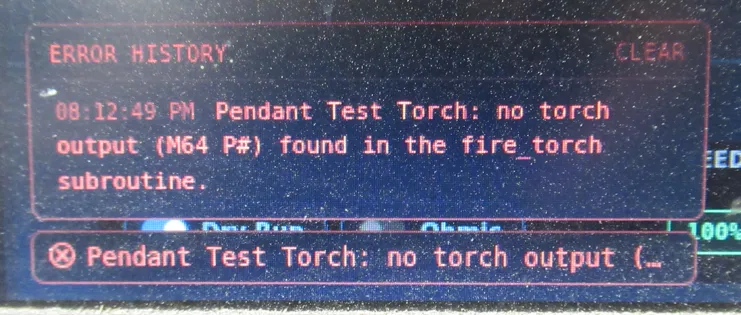
When I try to test fire my torch from the Pendant, I get this error -
XHC WHB04B-4 Pendant
6 Comments
showing 1–5 of 6Also the THC+ and THC- on the XHC WHB04B-4 pendant don't work. Shortcut keys on the keyboard do.
Thanks, Matt — we found the problem. The pendant Test Torch action was inspecting the configured fire_torch subroutine for a literal M64 P command. The current fire_torch subroutine instead uses the configured Torch Output through synchronized M62, causing the test action to reject an otherwise valid configuration.
We’ve replaced that assumption with a proper per-machine Test Torch setting. The recommended Auto option now resolves the configured output from the fire_torch subroutine and pulses that output directly, without executing the subroutine, running the touch-off sequence, or moving the machine. We also added direct M64/M65, M3 S…/M5, and custom ON/OFF command options for machines using different controller configurations.
We also aligned the pendant THC+/THC− buttons with the native AVTHC adjustment controls. The pendant, keyboard, and on-screen controls now follow the same adjustment path and behavior.
Both fixes will be available in the next JetCad3 release.
Doesn't seem like the Shuttle on/off button works either. Not sure if that would be connected to the test torch not working since it's the same button?
Also in Shuttle Mode, it seems like you should be able to use the pendant jog same as the keyboard jog to shuttle thru the program? The hand wheel does not run the shuttle move now.
Thanks, Matt — the shared button was a good clue, but the two actions are separate. A normal S-On/Off press runs Test Torch, while holding Fn and pressing S-On/Off toggles Shuttle Mode.
We found that Shuttle Mode itself was not being passed through to the pendant motion controls. The toolbar could show Shuttle Mode as active while the handwheel continued using ordinary axis jogging.
We’ve corrected that and expanded the fix beyond the WHB04B. When Shuttle Mode is active, supported pendant handwheels, Jog +/− buttons, Y+/Y− controls, Contour controls, and gamepad inputs will now shuttle forward and backward through the loaded program. When Shuttle Mode is off, they return to their normal jogging behavior.
This will be included in the next JetCad3 release. Thanks for catching it!
Confirmed pendant buttons Fire Torch, THC+, THC-, and Shuttle on/off work, as well as shuttling with the pendent dial. Shuttling is kinda jerky though, especially whith the dial, is that normal?
Sign in to leave a comment or vote.
Sign In